Markdown Kanban Roadmap
VS Code extension for task management with interactive Kanban boards
Table of Contents
Installation
For Cursor Users
If you're using Cursor IDE, add the rules to your User Rules to enable AI assistants to properly create and manage tasks:
- Open Cursor Settings → User Rules
- Copy the content from
rules/.cursorrules(see below) - Paste it into your User Rules
Copy Cursor Rules
From VS Code Marketplace
- Open VS Code Extensions view (
Ctrl+Shift+X/Cmd+Shift+X) - Search for "Markdown Kanban Roadmap"
- Click Install
From VSIX File
code --install-extension markdown-kanban-roadmap-*.vsix
Usage
1. Create a TASKS.md File
Create a markdown file (typically named TASKS.md) with the following structure:
TASKS.md# Tasks - project-name

## Backlog

### My First Task

  - id: T-001
  - tags: [backend, api]
  - priority: high
  - workload: Medium
  - start: 2026-01-15
  - due: 2026-01-30

## Doing

## Review

## Done

## Paused

## Notes
2. Open Kanban View
You have three ways to open the Kanban board:
- Button in editor: Click the "Kanban" button in the editor toolbar
- Command Palette:
Ctrl+Shift+P→ "Open Kanban Board" - Context menu: Right-click the markdown file → "Kanban"
3. Manage Tasks
- Drag & Drop: Move tasks between columns
- Edit: Click "Edit" button on any task
- Add: Use "+ Add Task" button at the bottom of columns
- Filter: Filter tasks by tags
- Sort: Sort by name, date, priority, etc.
Task Format
Required Properties
ID
- id: T-001
Unique identifier in format T-XXX
Optional Properties
Tags
- tags: [backend, frontend, ui]
Array of tags for categorization
Priority
- priority: high|medium|low
Task priority level
Workload
- workload: Easy|Normal|Hard|Extreme
Estimated effort required
Dates
- start: YYYY-MM-DD
- due: YYYY-MM-DD
Start and due dates
Milestone
- milestone: sprint-26-1_1
Group related tasks
Detail File
- detail: ./tasks/T-001.md
Link to detailed task file
Complete Example
Example with detail file reference:
TASKS.md### Implement user authentication

  - id: T-010
  - tags: [authentication, security, backend, frontend]
  - priority: high
  - workload: Hard
  - milestone: sprint-26-1_2
  - start: 2026-01-15
  - due: 2026-02-15
  - detail: ./tasks/T-010.md
  - defaultExpanded: false
Corresponding detail file:
tasks/T-010.md# T-010

  - steps:
      - [ ] Set up JWT token generation
      - [ ] Implement login endpoint
      - [ ] Create registration flow
      - [ ] Add password reset functionality
    ```md
    Implement complete authentication system with JWT tokens.
    Include login, registration, and password reset functionality.

    Requirements:
    - Secure token storage
    - Refresh token mechanism
    - Password hashing with bcrypt
    ```
Features
Kanban Board View
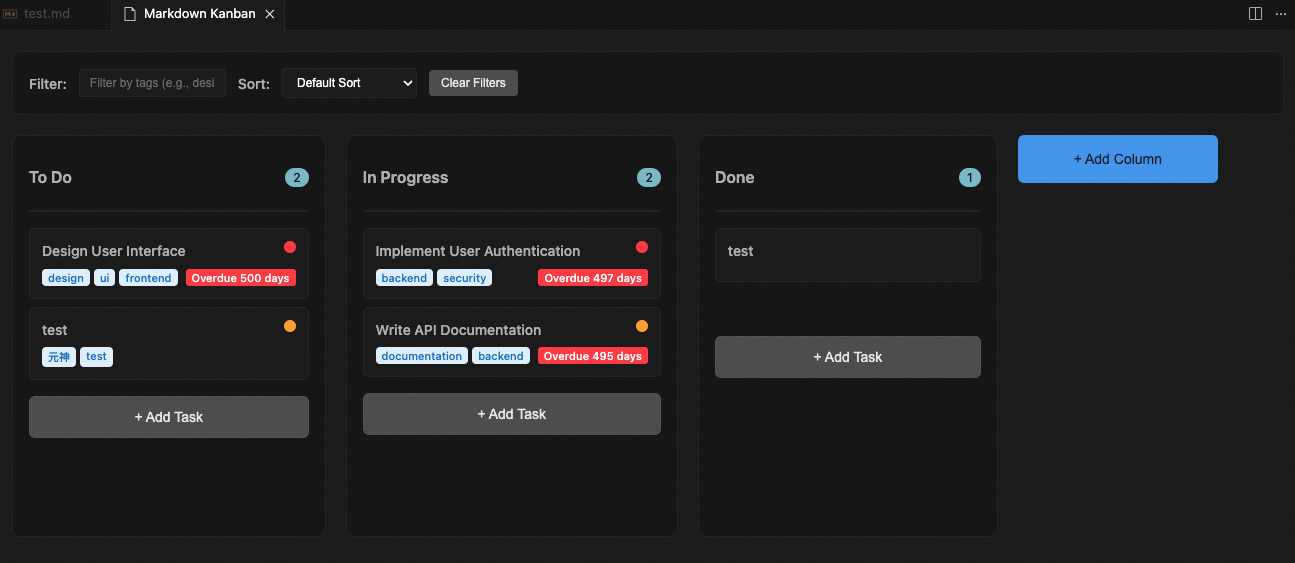
Roadmap View
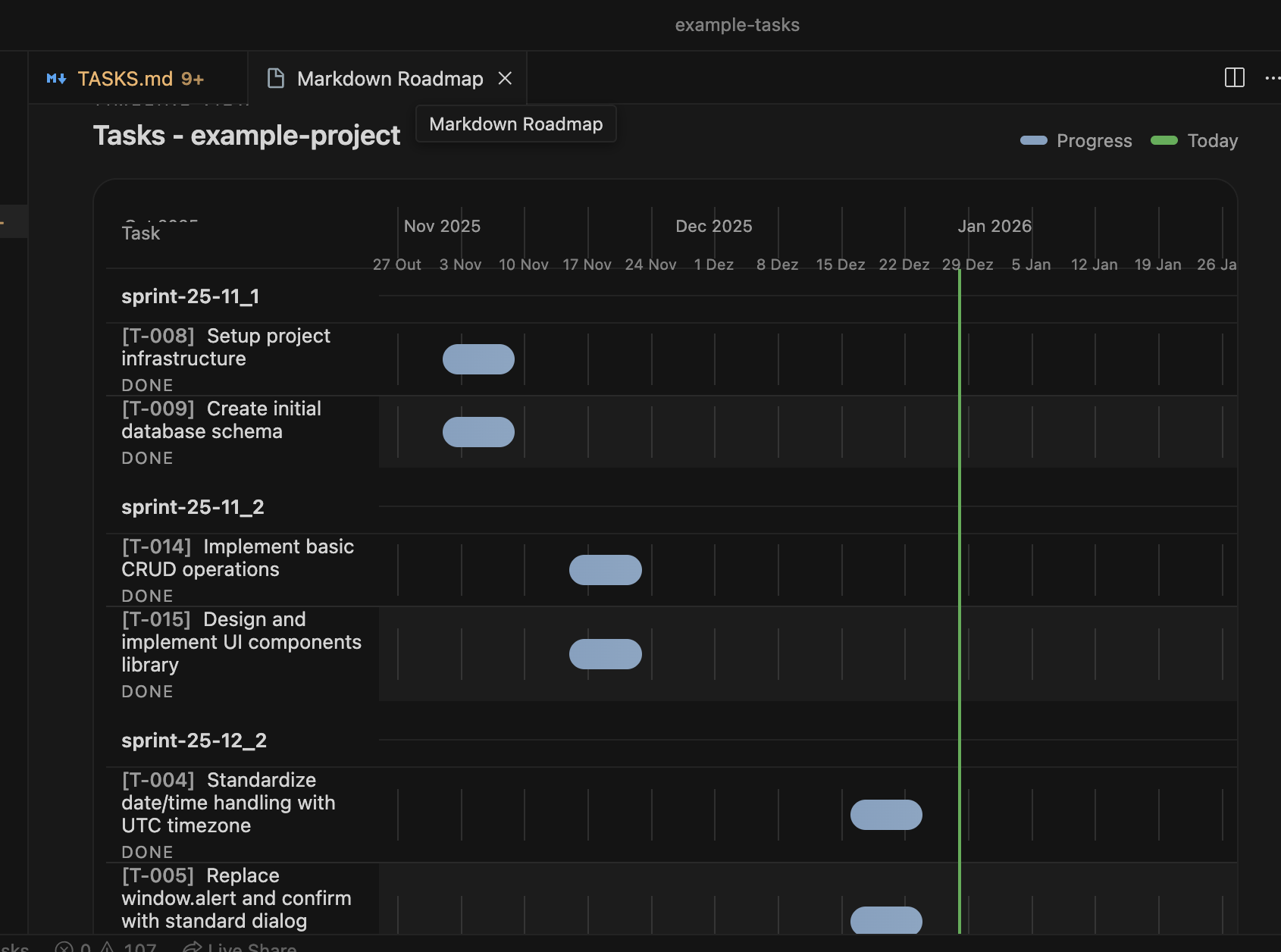
How to Open Kanban
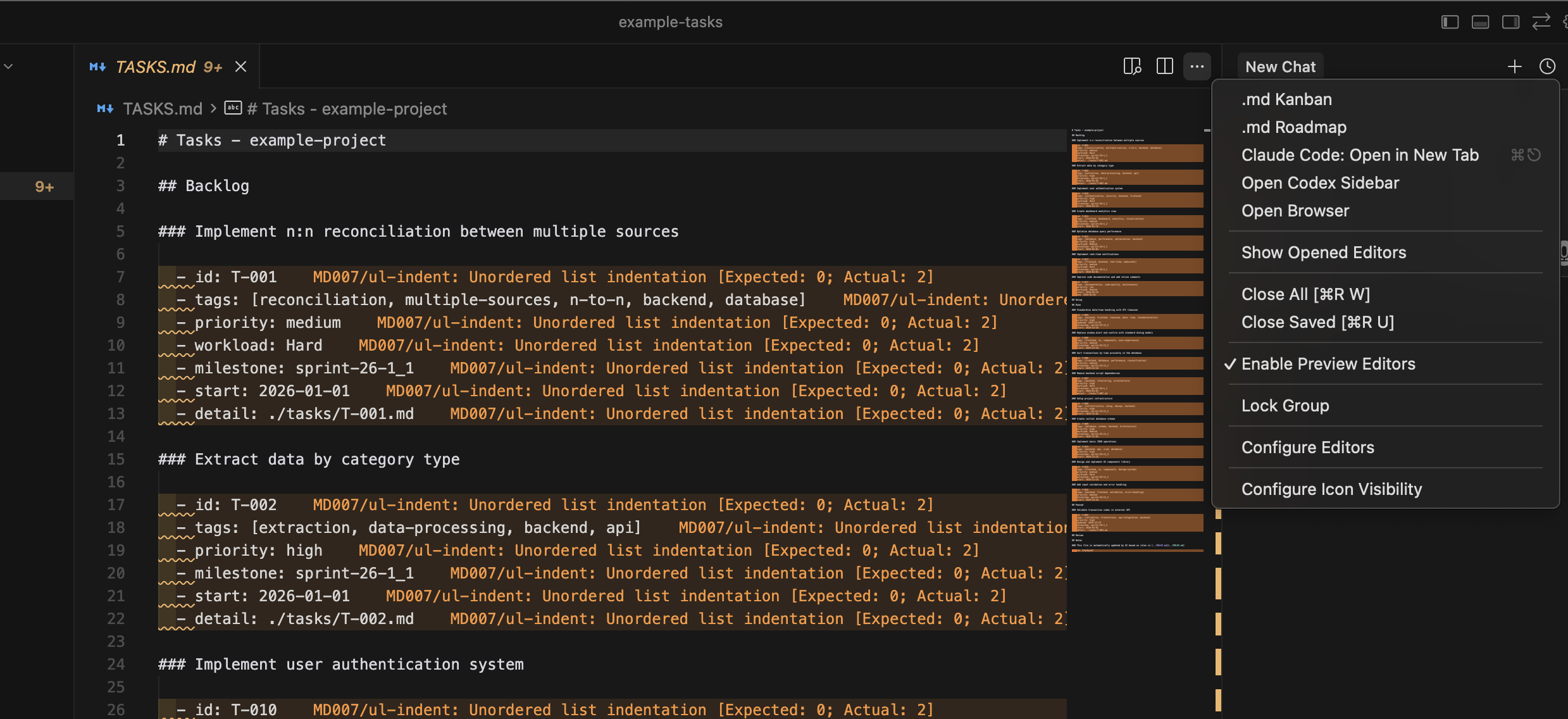
Feature Overview
Kanban Board
Interactive Kanban board with drag & drop support
Roadmap View
Timeline view of tasks with start and due dates
Tag Filtering
Filter tasks by tags (supports multiple tags)
Sorting
Sort by name, date, priority, workload
Task Details
Support for detailed task files and inline descriptions
Real-time Sync
Two-way synchronization between Kanban and Markdown
AI Development Rules
Rules Documentation
The project includes detailed rules in the rules/ directory:
AGENTS.md
Comprehensive rules for any AI assistant working with Markdown Kanban files
rules/AGENTS.md
Key Rules for AI Assistants
Task Creation
- Always use format
### Task Namefor task titles - Include unique
id: T-XXX(find next available ID) - Use 2 spaces indentation for all properties
- Place tasks in correct Kanban sections (Backlog, Doing, Review, Done, Paused)
- Use date format
YYYY-MM-DDfor all dates
Task Properties
- Required:
id - Optional:
tags,priority,workload,start,due,milestone,detail,defaultExpanded - Tags must be in array format:
[tag1, tag2, tag3] - Priority values:
high,medium,low - Workload values:
Easy,Normal,Hard,Extreme
File Structure
TASKS.md structure# Tasks - project-name

## Backlog
## Doing
## Review
## Done
## Paused
## Notes
Detail Files
For complex tasks, create separate detail files:
tasks/T-001.md# T-001

  - steps:
      - [ ] Step 1
      - [x] Step 2 (completed)
      - [ ] Step 3
    ```md
    Detailed task description here.
    Can include multiple lines and formatting.
    ```
TASKS.md files, always refer to the rules in rules/ directory to ensure proper format and compatibility.
Quick Reference
# Task format
### Task Name

  - id: T-001
  - tags: [tag1, tag2]
  - priority: high
  - workload: Medium
  - start: 2026-01-15
  - due: 2026-01-30
Team Organization Patterns
Choose the organization pattern that best fits your team size and project structure:
Pattern 1: Centralized TASKS.md in Main Branch
Ideal for: Small to medium teams, projects with few modules
Structureproject/
  ├── TASKS.md          # Single file in main branch
  ├── src/
  └── tasks/            # Detail files
      ├── T-001.md
      └── T-002.md
Advantages
- Single centralized view
- Easy to track overall progress
- Simple to implement
- Ideal for smaller projects
Disadvantages
- Frequent merge conflicts
- Requires discipline to update
- Can become too large
- Difficult parallel work
Pattern 2: TASKS.md per Module/Component
Ideal for: Large projects, large teams, modular architecture
Structureproject/
  ├── frontend/
  │   ├── TASKS.md
  │   └── tasks/
  ├── backend/
  │   ├── TASKS.md
  │   └── tasks/
  ├── shared/
  │   ├── TASKS.md
  │   └── tasks/
  └── TASKS.md          # General/cross-cutting tasks
Advantages
- Clear organization by context
- Fewer merge conflicts
- Teams work independently
- Scalable for large projects
Disadvantages
- Multiple files to manage
- Fragmented project view
- Requires coordination
- Possible duplicate tasks
Pattern 3: Dedicated Branch for Tasks
Ideal for: Teams wanting to separate planning from code, projects with many developers
StructureBranch: main
  └── project code

Branch: tasks/kanban
  └── TASKS.md
  └── tasks/
      ├── T-001.md
      └── T-002.md
Advantages
- Clear separation of planning and code
- Zero conflicts with code
- Can have multiple TASKS.md by context
- Independent task history
Disadvantages
- More complex workflow
- Requires periodic merging
- Can become outdated
- Less integrated with code
tasks/ or kanban/ branch for task management. Feature branches reference tasks by ID. Periodically merge the tasks branch into main.
Pattern 4: Hybrid (Recommended)
Ideal for: Most projects, balance between simplicity and organization
Structureproject/
  ├── TASKS.md          # Overview in main
  ├── tasks/            # Details
  │   ├── T-001.md
  │   └── T-002.md
  └── docs/
      └── TASKS-PLANNING.md  # Future planning
Advantages
- Balance between simplicity and organization
- Main TASKS.md for overview
- Separate detail files
- Flexible and adaptable
- Works well with Git Flow
Disadvantages
- Occasional conflicts still possible
- Requires team discipline
- May need adjustments as it grows
Pattern 5: TASKS.md per Feature/Epic
Ideal for: Projects with large features, agile methodology with epics
Structureproject/
  ├── features/
  │   ├── auth/
  │   │   └── TASKS.md
  │   ├── dashboard/
  │   │   └── TASKS.md
  │   └── api/
  │       └── TASKS.md
  └── TASKS.md          # General tasks
Advantages
- Organization by feature/epic
- Easy to track feature progress
- Fewer conflicts
- Aligns with agile methodology
Disadvantages
- Multiple files
- Features may have related tasks
- Requires coordination
Recommendations by Team Size
1-3 Developers
Recommended: Pattern 1 (Centralized) or Pattern 4 (Hybrid)
Simplicity is more important than complex organization.
4-8 Developers
Recommended: Pattern 4 (Hybrid) or Pattern 2 (Per Module)
Balance between organization and simplicity.
9+ Developers
Recommended: Pattern 2 (Per Module) or Pattern 5 (Per Feature)
Organization and separation of concerns are essential.
Examples
Basic Task
TASKS.md### Fix login bug

  - id: T-005
  - tags: [bug, frontend, authentication]
  - priority: high
  - workload: Easy
Task with Dates
TASKS.md### Implement dark mode

  - id: T-012
  - tags: [ui, frontend, feature]
  - priority: medium
  - workload: Normal
  - start: 2026-01-20
  - due: 2026-02-05
Task with Detail File
TASKS.md### Build API endpoints

  - id: T-020
  - tags: [backend, api, rest]
  - priority: high
  - workload: Hard
  - detail: ./tasks/T-020.md
example-tasks/ directory in the repository for complete working examples.